AI
The Great AI Coding Shake-Up of 2025: Why I'm Breaking Up with Windsurf to Augment Code
A story from the trenches about breaking up with Windsurf, leaving Cursor behind, and finding a new AI co-pilot in Augment Code.

Another Tuesday, another pull request. The coffee is brewing, the Slack notifications are… notifying, and I’m staring at a function so tangled it looks like it was written by a spider on espresso. We’ve all been there. For the last year, the promise of an AI pair programmer has been the light at the end of my debugging tunnel. And I’ve been on a quest, a journey through the wild, wonderful, and sometimes weird world of AI coding assistants.
This isn’t just another feature-by-feature comparison. This is a story from the trenches. A story about my recent, and rather decisive, breakup.
I’ve been a paying customer of Windsurf, I’ve dabbled with Cursor, and now, I’ve found a new co-pilot in Augment Code. I’m here to tell you why I’m making the switch, and why you might want to re-evaluate your own AI toolkit.
Windsurf: The One I’m Leaving
Let’s be clear: Windsurf isn’t a bad tool. It’s a full-fledged, AI-first IDE built on a fork of VS Code, and it has some serious muscle. For a while, it was my daily driver. Its “Supercomplete” feature, which pulls context from across multiple files, felt like magic. The “Cascade” feature, designed for creating complex AI workflows, showed a ton of promise for enterprise-level work. If you’re in a highly regulated industry, Windsurf’s focus on security is a big plus.

So, why the breakup?
Honestly, living inside a dedicated AI-first IDE started to feel less like a feature and more like a beautifully designed cage. While it was powerful, it was also… a lot. The learning curve was real, and I found myself fighting its opinions on workflow more often than I’d like. And while recent updates brought in a built-in browser and some task management features, it felt like catch-up. The core experience hadn’t evolved enough to justify the subscription, especially when I saw what else was out there. The magic had faded.
Cursor: The One I’ve Already Left Behind
Ah, Cursor. I remember the honeymoon phase well. It was intuitive, friendly, and for a while, it was the gold standard for adding AI to your coding process. It felt like VS Code on steroids, and for smaller projects and quick edits, it was fantastic.
But then, things changed.
The single most important thing an AI coding assistant can do is produce reliable, high-quality code. And, to put it bluntly, Cursor started letting me down. The suggestions became less relevant, the generated code became buggier, and I spent more time correcting its mistakes than I would have spent writing the code myself. It’s a dealbreaker. I saw chatter on Reddit and other forums echoing my experience, so I knew I wasn’t alone. New features like “BugBot” for code reviews are nice in theory, but they don’t fix the fundamental problem: I no longer trust the code it writes. And trust, in programming, is everything.
Augment Code: The Surprise Winner
I’ll admit, I was sceptical when I first tried Augment Code. Another AI tool? What could it possibly do differently? Well, as it turns out, quite a lot.
The first thing that blew me away was its uncanny ability to understand my entire codebase. Unlike other tools that feel like they have short-term memory loss, Augment Code’s context engine and continuous indexing give it a deep, holistic understanding of the project. It doesn’t just see the file you’re in; it sees the whole Rube Goldberg machine you’ve built.
This is where its “task orchestrator” comes into play. You can give it a complex task, like “Refactor the user authentication flow to use a new passport.js strategy and then write integration tests for it,” and it doesn’t just spit out a blob of code. It breaks the problem down into a logical task list, plans its attack, and executes it step-by-step. You can even edit the plan, adding or removing steps before it starts. It’s like having a junior dev who actually listens.

The best part? It integrates directly into the IDE I already use and love. No weird, walled-garden environment. It’s just there, in VS Code or JetBrains, ready to help when I need it. The recently added “Remote Agent” that can work on tasks in the background is just the cherry on top. It feels less like a tool and more like a true collaborator.
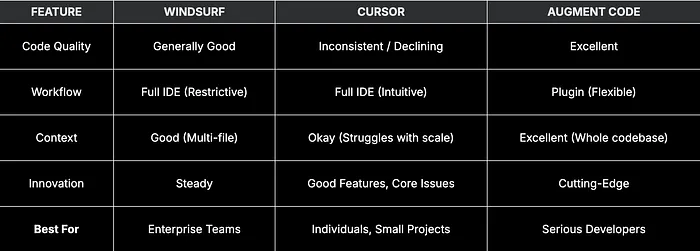
Head-to-Head: A Developer’s Verdict
Conclusion: My New AI Co-Pilot
The world of AI development tools is moving at a breakneck pace. A year ago, I would have recommended a completely different setup. But right now, in mid-2025, my choice is clear.
I’m cancelling my Windsurf subscription because Augment Code offers a more powerful, flexible, and integrated experience for less hassle. I left Cursor behind because its core value — writing good code — eroded.
For developers who work on large, complex codebases and demand a high degree of reliability from their tools, Augment Code is the surprise champion. It has genuinely improved my workflow, saved me countless hours of grunt work, and made coding fun again. My tangled-function-writing spider has finally met its match.
What has your experience been? Let me know in the comments below!