AI
From Vibe Coding to Deliberate Design: My First Week with Kiro IDE
The AI coding landscape is finally growing up. Kiro's spec-oriented development turns chaotic AI coding into a predictable, accountable collaboration.
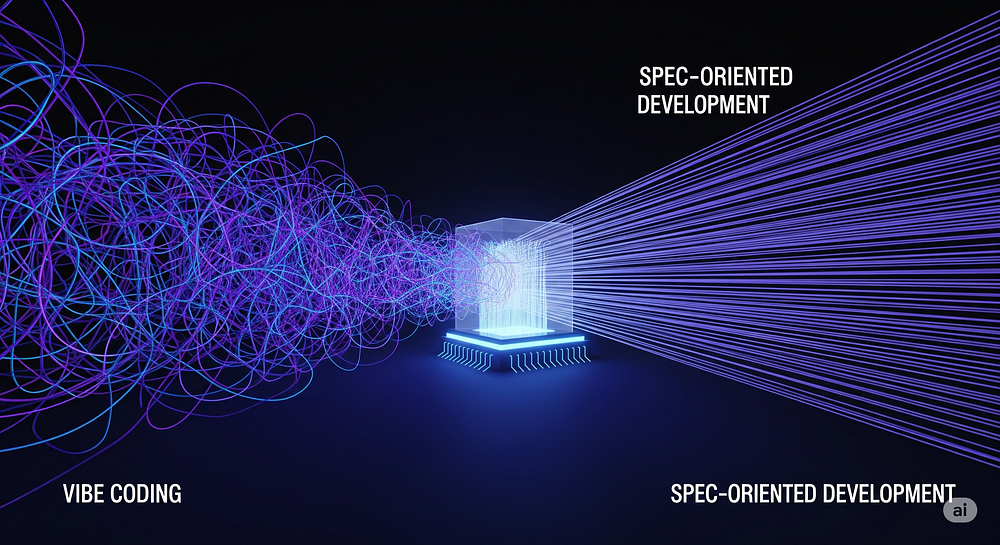
A few months ago, I wrote about my “break-up” with the first wave of AI coding assistants. It was a whirlwind romance, full of dazzling autocomplete suggestions and moments of pure magic. But like any relationship built purely on “vibes,” it eventually got… messy. I was spending more time babysitting my AI pair programmer than actually programming, correcting its weird detours and cleaning up its confident mistakes. The initial thrill of “vibe coding” — just throwing a prompt at the wall and seeing what sticks — gave way to a low-grade headache.
I longed for a partner, not a hyperactive intern.
Then, just a couple of days ago, a new name started popping up in my developer feeds: Kiro. Billed as a new AI-native IDE from Amazon, it promised something different. Intrigued, I downloaded it, and after my first session, one thought became crystal clear: the AI coding landscape is finally growing up.
And honestly, I love the clean interface. It continues the trend of great UI design we’ve seen in tools like Windsurf and Augment Code, but with its own purpose-driven feel. Every element seems intentionally placed to support its ‘spec-oriented’ philosophy, creating a workspace that encourages you to think before you code.
The Big Shift: From “Vibes” to “Specs”
The core difference in Kiro isn’t another fancy chat window or a slightly-smarter autocomplete. It’s a fundamental shift in philosophy. Kiro gently, but firmly, guides you away from impulsive vibe coding toward something it calls Spec-Oriented Development.
If vibe coding is jumping in a car and yelling “take me somewhere cool!” at the driver, spec-oriented development is handing them a detailed itinerary first.
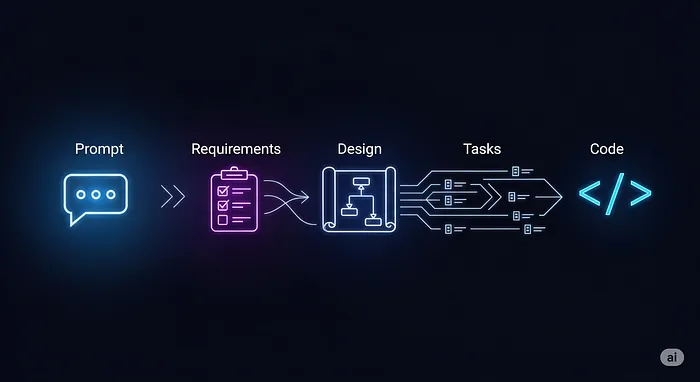
It’s a simple but profound three-step dance:
- The Requirements (
requirements.md): You start with a prompt, same as always. “I want to add a blog feature to my Next.js app.” But instead of instantly spewing code, Kiro generates a clear, concise markdown file. It outlines user stories and acceptance criteria. This simple step forces a pause, making you confirm what you’re building before the AI touches a single line of code. - The Blueprint (
design.md): Once you approve the requirements, Kiro puts on its architect hat. It performs deep codebase indexing to understand your existing project—your patterns, your components, your tech stack. Then, it produces a stunningly detaileddesign.md. We’re talking architectural diagrams, data flow explanations, new database schemas, and even TypeScript interfaces. This is the “Aha!” moment. You see the entire plan before the first brick is laid. - The Checklist (
task.md): Finally, with the blueprint approved, Kiro generates a granulartask.mdfile. It’s a complete checklist of every action it will take, from creating files and installing dependencies to writing tests and handling errors. You can review, modify, and then give the final “go-ahead.”
This workflow is a game-changer. It transforms the AI from a wildcard into a predictable, accountable collaborator. The chaos is gone, replaced by deliberate, verifiable steps.
The Superpowers: Hooks and Steering
Beyond the core workflow, Kiro has a couple of other tricks up its sleeve that feel like the missing pieces from older tools.
Agent Hooks are my personal favourite. Think of them as IFTTT (“If This, Then That”) for your codebase. They are event-driven automations that you define. For example, you can create a hook that says:
- “IF a new React component file is saved…”
- “THEN automatically generate a Storybook file for it.”
Or:
- “IF a file in the /api/ directory is changed…”
- “THEN run our custom security review script on it.”
These hooks live in your codebase so they can be version-controlled and shared with your team, enforcing best practices without anyone having to think about it. It’s automation that builds quality in, not bolts it on.
Agent Steering is the AI’s “project constitution.” When you first open a project, Kiro can generate steering documents that define your project’s architecture, tech stack, and coding conventions. This gives the AI a set of unbreakable rules to follow, ensuring it generates code that feels like it was written by someone on your team, respecting your established patterns.
Kiro vs. The Old Guard: Is It a Fair Fight?
So, does this mean I’ve completely uninstalled Windsurf and my trusty Augment Code plugin? Not yet. Each tool has its place on the ever-expanding developer workbench. Based on my experience, here’s how they stack up:
- Windsurf & Augment Code (Vibe Coding): These tools are still fantastic for quick-fire tasks, rapid prototyping, and those in-the-moment “just get it done” sprints. When the goal is pure speed and generating boilerplate or a quick function, their tactical, direct-prompting approach is hard to beat.
- Kiro (Spec-Oriented Development): This is my new go-to for strategic, complex tasks. Adding a major new feature to a mature codebase, refactoring a core module, or any job where predictability and accuracy are more important than raw, immediate speed.
Putting a new, non-trivial feature into a mature codebase using the pure vibe-coding method was always a recipe for anxiety. Kiro feels custom-built to solve that exact problem.
The Verdict After Week One
Kiro isn’t just another AI code editor. It’s an opinionated platform with a strong vision for the future of software development — a future built on partnership, not just prompts. It trades the instant gratification of chaotic code generation for the long-term satisfaction of a well-executed plan.
While it’s still early days (it was only released a little while ago!), Kiro feels like the first tool to truly understand that the hardest part of software isn’t writing code; it’s building the right code, cleanly and consistently. It’s still an AI, and it’s not perfect, but it’s the first one that feels less like a coding-crazed intern and more like a seasoned architect. And for the health of my projects (and my sanity), that’s a relationship I’m ready to invest in.